
Download Twain – AI Writing Assistant for Sales Outreach
Overview of Twain – The AI‑Powered Outreach Companion
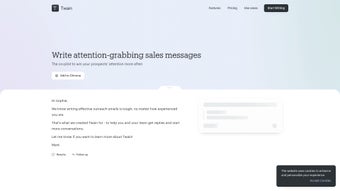
Twain is a next‑generation AI writing assistant specifically engineered for outbound sales and recruitment outreach. By blending natural‑language generation with contextual awareness, Twain helps professionals craft personalized messages that feel authentic across email, LinkedIn, and other communication channels. Whether you prefer a direct, data‑driven tone, a creative storytelling style, or a casual conversational voice, Twain adapts to your unique preferences and continuously refines its suggestions based on real‑time feedback.
The platform covers the entire outreach lifecycle—from the first hook that grabs attention, through follow‑up nudges, to proposal drafts—so users can focus on strategy rather than repetitive copywriting. Its built‑in analysis engine evaluates small talk, filler words, and conditional statements, offering instant improvement tips that boost response rates. With a free tier and several paid plans, Twain is accessible to solo entrepreneurs, small teams, and enterprise sales forces alike.
The tool’s emphasis on context‑driven, goal‑oriented messaging makes it a valuable asset for anyone looking to streamline their outreach, reduce writer’s block, and ultimately close more deals.
Core Features & Benefits That Set Twain Apart
Twain’s feature set is built around the idea of making every outbound message feel handcrafted while still leveraging the speed of AI. Below is a detailed look at the capabilities that make Twain a compelling addition to any sales or recruiting toolkit.
- AI‑Generated Personalization: Generates subject lines, intros, and body copy tailored to each prospect’s profile, industry, and recent activity.
- Tone Customization Engine: Choose from Direct, Creative, Casual, or define a custom tone; Twain learns your preferred style over time.
- Multi‑Channel Support: Seamlessly creates content for Email, LinkedIn InMail, and even SMS outreach without switching platforms.
- Real‑Time Improvement Suggestions: Highlights filler words, overly complex sentences, and weak calls‑to‑action, offering concise alternatives.
- Follow‑Up Sequencing: Automatically drafts follow‑up messages based on recipient behavior (opens, clicks, replies).
- Proposal Draft Builder: Turns high‑level talking points into polished proposals, complete with sections for value propositions and next steps.
- Analytics Dashboard: Tracks open rates, response rates, and AI‑suggested vs. actual performance to help refine future outreach.
- Collaboration Mode: Teams can share drafts, leave comments, and approve messages before sending, ensuring brand consistency.
Each feature is designed to reduce the time spent on manual copywriting while enhancing the relevance of each outreach attempt. For example, the AI‑Generated Personalization pulls data from LinkedIn profiles and recent news articles, ensuring that the first line feels uniquely relevant. Meanwhile, the Analytics Dashboard provides actionable insights that let you test different tones or subject lines, turning intuition into data‑driven decisions. Whether you’re a solo founder looking to automate cold outreach or a recruiting manager handling hundreds of candidate messages weekly, Twain’s modular feature set scales with your needs.
Installation, Compatibility, and How to Use Twain Effectively
Step‑by‑Step Installation
Getting started with Twain is straightforward and designed for both tech‑savvy users and beginners. Follow these steps to have the AI assistant up and running in under ten minutes:
- Visit the Official Site: Navigate to twain.ai and click the “Download” button that matches your operating system.
- Select Your Platform: Choose from Windows (10 or later), macOS (Catalina or later), Linux (Ubuntu 20.04+), iOS (13+), or Android (8+).
- Create an Account: Sign up using an email address or single‑sign‑on with Google or Microsoft. A verification email will be sent to confirm your identity.
- Install the Application: Run the installer (EXE for Windows, DMG for macOS, DEB for Linux) or download the mobile app from the App Store / Google Play.
- Connect Your Communication Channels: Grant Twain permission to access your email client (Outlook, Gmail) and LinkedIn account for seamless message insertion.
- Choose a Plan: Start with the free tier to explore core features or upgrade to a paid plan for unlimited AI generations and advanced analytics.
Operating System Compatibility
Twain is built on a cross‑platform architecture, supporting Windows 10/11, macOS Catalina and later, major Linux distributions (Ubuntu, Fedora), iOS 13+, and Android 8+. The cloud‑based AI engine ensures consistent performance regardless of the device, while the local client handles UI rendering and secure storage of drafts.
Practical Usage Workflow
Once installed, using Twain follows a simple three‑phase workflow:
- Define Your Outreach Goal: Select “Cold Email,” “LinkedIn InMail,” or “Follow‑Up” from the dashboard. Input the prospect’s name, company, and any relevant context (e.g., recent product launch).
- Generate the Draft: Click “Generate.” Twain produces a complete message with subject line, greeting, body, and CTA. Review the suggestions, tweak tone sliders if needed, and accept the final version.
- Send & Track: Hit “Send” directly from Twain or copy the content into your preferred email client. The built‑in tracker monitors opens, clicks, and replies, feeding data back into the AI for future refinements.
The platform also offers a “Template Library” where you can save high‑performing drafts for quick reuse. For teams, the “Collaboration Mode” lets a manager review and approve drafts before they hit a prospect’s inbox, ensuring brand compliance across all outreach activities.
Pros, Cons, and Frequently Asked Questions About Twain
Pros
- Highly personalized AI output reduces generic outreach.
- Supports multiple channels (email, LinkedIn, SMS) from a single interface.
- Real‑time suggestions improve message clarity and impact.
- Free tier available for testing core functionalities.
- Robust analytics help fine‑tune outreach strategies.
- Cross‑platform compatibility ensures accessibility on desktop and mobile.
- Collaboration features keep team messaging consistent.
Cons
- Advanced analytics and unlimited AI generations require a paid plan.
- Initial onboarding may take a few minutes to connect all communication channels.
- AI suggestions can sometimes be overly formal for very casual brand voices.
- Internet connection is required for AI processing; offline drafting is limited.
Frequently Asked Questions
Is Twain truly free or does it have hidden costs?
Twain offers a free tier that includes up to 50 AI‑generated messages per month, basic analytics, and access to core tone settings. There are no hidden fees, but premium features such as unlimited generations, advanced team collaboration, and detailed performance dashboards are part of the paid plans.
Can I use Twain with my existing CRM?
Yes. Twain integrates with popular CRMs like HubSpot, Salesforce, and Pipedrive via native connectors or Zapier. This allows you to pull prospect data directly into Twain and push sent messages back into the CRM for complete activity tracking.
How secure is my data when using Twain?
Twain uses end‑to‑end encryption for all data in transit and at rest. Drafts are stored in encrypted containers on your device, and the cloud AI engine never retains personally identifiable information beyond the session needed for generation.
Does Twain work on mobile devices for on‑the‑go outreach?
Absolutely. Twain offers native iOS and Android apps that mirror the desktop experience, letting you generate, edit, and send messages directly from your smartphone or tablet. All features, including analytics and collaboration, are fully functional on mobile.
What kind of support does Twain provide for new users?
New users can access a comprehensive knowledge base, video tutorials, and a community forum. Paid subscribers also receive priority email support and optional live onboarding sessions with a dedicated success manager.
Overall Rating: 4.5 / 5
Conclusion – Should You Download Twain Today?
In a market saturated with generic email generators, Twain distinguishes itself by focusing on contextual relevance and tone fidelity. Its ability to craft nuanced, personalized outreach across multiple channels saves sales professionals and recruiters countless hours while boosting response rates. The free tier provides a low‑risk entry point, and the scalable pricing plans make it suitable for both solo entrepreneurs and large teams. While premium features require a subscription, the core functionality already delivers tangible value for most users. If you’re looking to eliminate writer’s block, increase the professionalism of your messages, and leverage data‑driven insights to refine your outreach, Twain is a solid investment.
Ready to transform your outbound communication? Download Twain now and start generating high‑impact sales messages in seconds. Experience the blend of AI efficiency and human‑like personalization that only Twain can provide.



.png)



